
CrowdStrike Falcon Spotlight
Integrate CrowdStrike Falcon Spotlight vulnerability management into the Query Security Data Mesh to retrieve and analyze vulnerability data with AI-powered prioritization
TL;DRTo integrate CrowdStrike Falcon Spotlight into the Query Security Data Mesh:
- Create an API Client with the appropriate scopes for Spotlight Vulnerabilities.
- Configure a CrowdStrike Falcon Connector with your Client ID, Client Secret, and (optionally) API endpoint base URL.
- Use Query Federated Security to support Threat & Vulnerability Management tasks on normalized CrowdStrike Falcon Spotlight vulnerability data.
Overview
CrowdStrike Falcon Spotlight is a vulnerability management solution that provides real-time vulnerability assessment, management, and AI-powered prioritization without requiring traditional vulnerability scanners. Built natively within the CrowdStrike Falcon platform, Spotlight leverages the same lightweight agent to deliver comprehensive vulnerability insights across Windows, Linux, and Mac systems.
Falcon Spotlight stands out in the vulnerability management space through its scanless approach and integration with CrowdStrike's ExPRT.AI (Exploit Prediction Rating Technology), which uses machine learning trained on world-class threat intelligence and real-world attack data to prioritize vulnerabilities based on actual exploitation likelihood rather than just CVSS scores.
Query Federated Security integrates with the CrowdStrike Falcon Spotlight Vulnerabilities API using the official FalconPy SDK to securely access and normalize vulnerability data. This integration enables security teams to conduct comprehensive vulnerability assessments, threat hunting, and risk management activities without duplicating or retaining data in separate systems.
Other CrowdStrike IntegrationsQuery offers additional CrowdStrike integrations to complement your Identity Protection deployment:
- CrowdStrike Falcon Connector - Comprehensive integration with Falcon EDR APIs including alerts, detects, incidents, hosts, and user management
- CrowdStrike Falcon Identity Protection Connector - Dedicated Identity Threat Management integration for Identity Protection data and Zero Trust Assessments
Additionally, Query has an open source project named Query Open Pipeline for CrowdStrike FDR that will extract, transform, and load ~200 FDR events into OCSF 1.2.0 for ingestion into Amazon Security Lake.
Finally, we also have an integrate with the CrowdStrike Falcon Next Gen SIEM (NGS) for more dynamic data sources stored in NGS Repositories.
All federated searches are expressed in terms of the Query Data Model (QDM), which is based on the Open Cybersecurity Schema Framework (OCSF). Falcon Spotlight vulnerability data is normalized into the Vulnerability Finding Event Class to standardize the data for enhanced analysis, filtering, and cross-platform correlation.
| API Name | QDM/OCSF Event Class | Supported Entities |
|---|---|---|
| Spotlight Vulnerabilities | Vulnerability Finding | Account ID CVE ID CWE ID Hostname IP Address Resource ID |
Prerequisites
To create an API Client for Falcon Spotlight integration with the Query Security Data Mesh, follow these steps:
-
Login to your CrowdStrike Falcon console with an account that has permissions to create API keys.
-
In the dropdown navigation menu in the upper-left, select Support and Resources --> API clients and keys as shown below (FIG. 1).
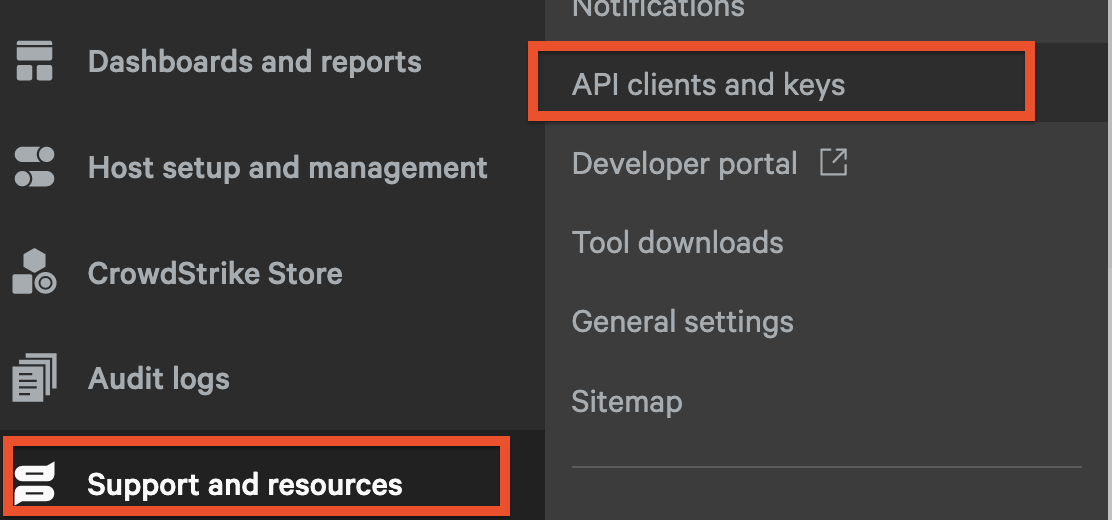
FIG. 1 - API Clients and Keys menu in the CrowdStrike Falcon console
-
Select Create API client in the upper right corner as shown below (FIG. 2).
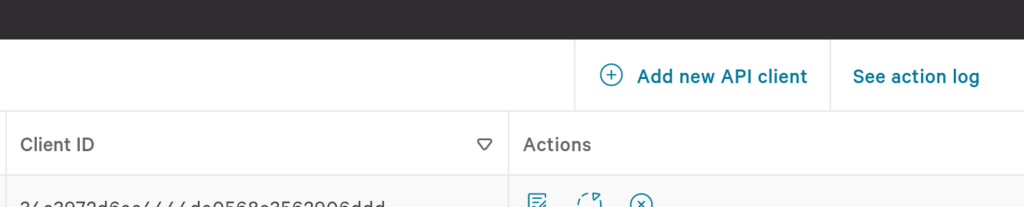
FIG. 2 - Create a new CrowdStrike API Client
-
Enter a Client name and optional Description, then add the Spotlight Vulnerabilities (Read) scope as shown below (FIG. 3).
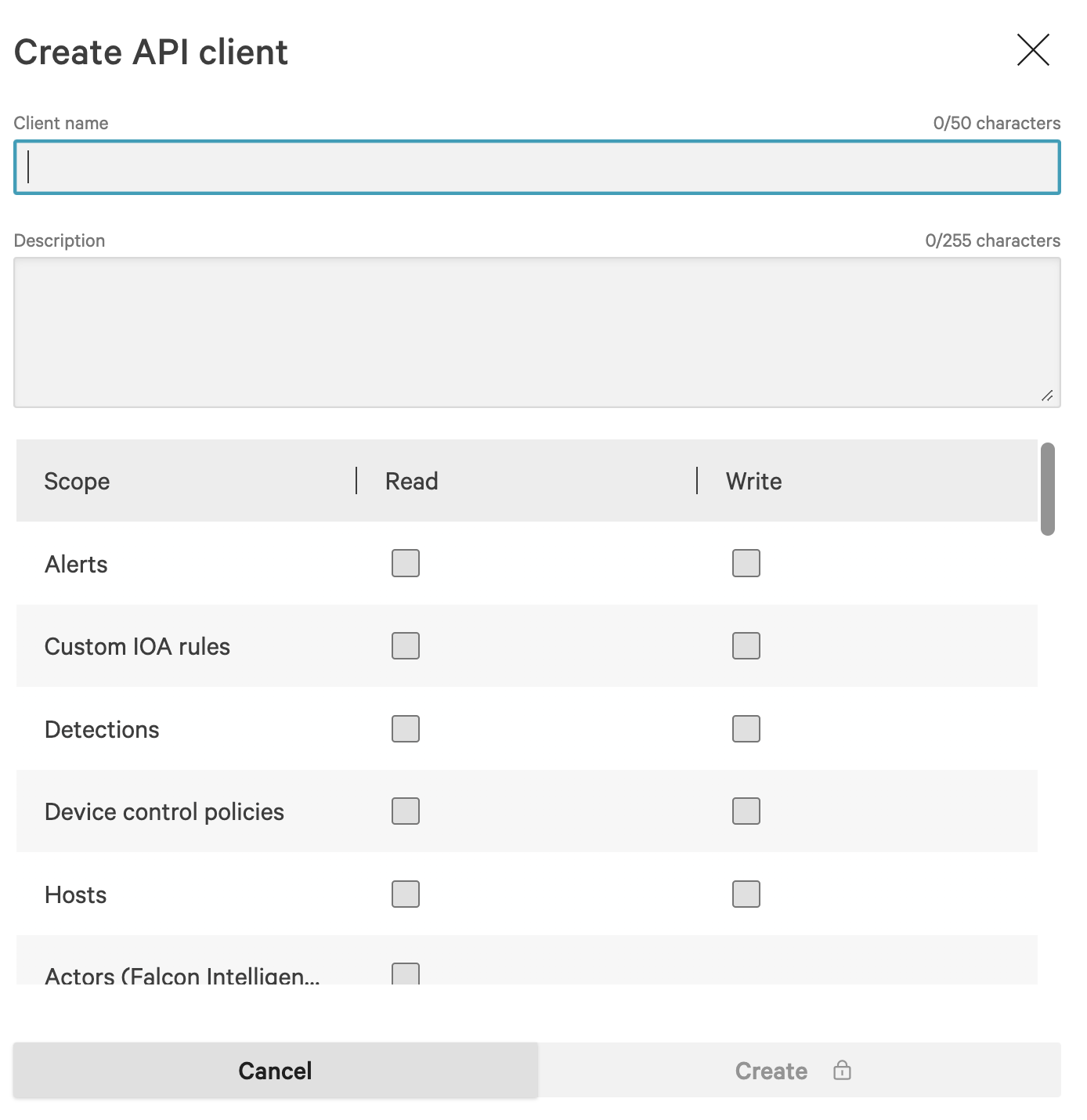
FIG. 3 - API Client configuration for Spotlight
Minimum Required ScopeFor Falcon Spotlight integration, you only need the Spotlight Vulnerabilities (Read) scope. This provides access to vulnerability data while maintaining the principle of least privilege.
If you plan to use other CrowdStrike Falcon capabilities through Query (such as Alerts or Host data), you can add additional scopes as needed.
-
When complete, select Save and copy the Client ID and Secret for your Query Security Data Mesh Connector configuration (FIG. 4).
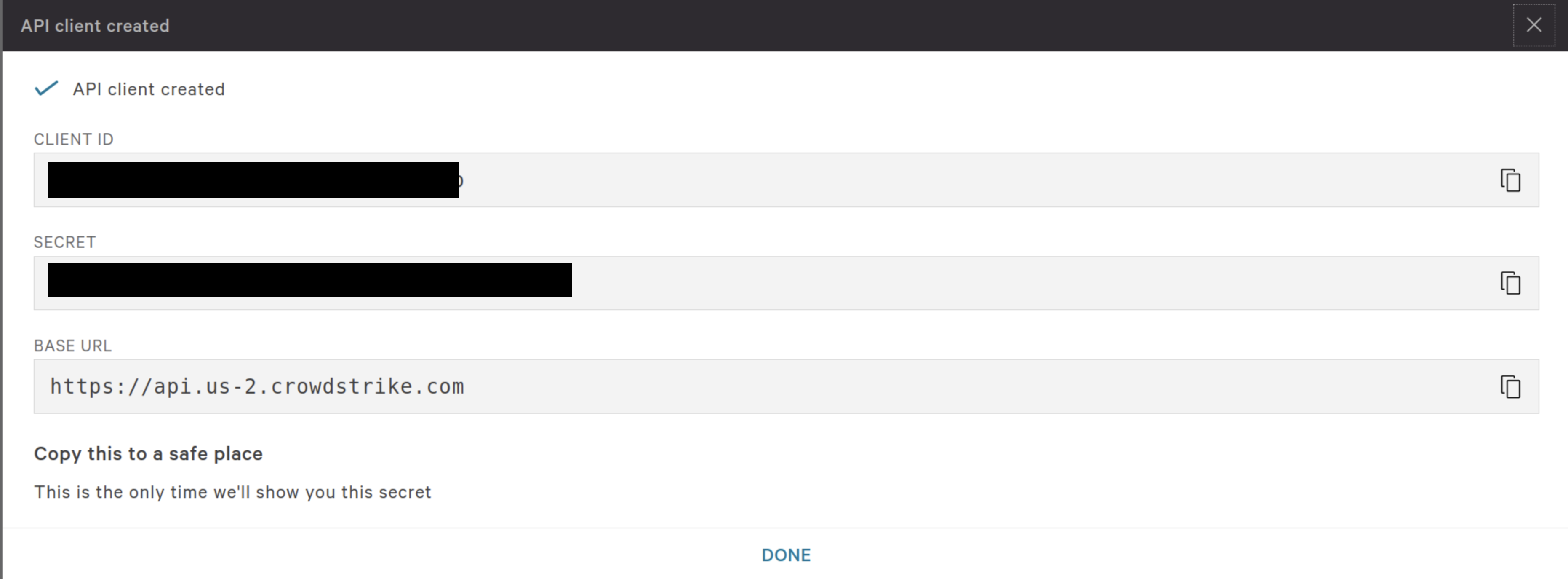
FIG. 4 - Copying the Client ID, Secret, and Base URL
Optionally, note the API base URL if you have a region-specific instance (e.g., us.gov or eu). The FalconPy SDK will auto-discover the correct endpoint in most cases.
Security Best PracticesAPI credentials are stored securely in AWS Secrets Manager with encryption and minimum necessary access permissions. The Client Secret is never cached or persisted outside of the secure secret store, ensuring your CrowdStrike API credentials remain protected.
Configure the CrowdStrike Falcon Spotlight Connector
Use the following steps to create a new Query Federated Security Connector for CrowdStrike Falcon Spotlight:
-
Navigate to the Connectors page, select Add Connector, and select CrowdStrike Falcon from the Endpoint category as shown below (FIG. 5).
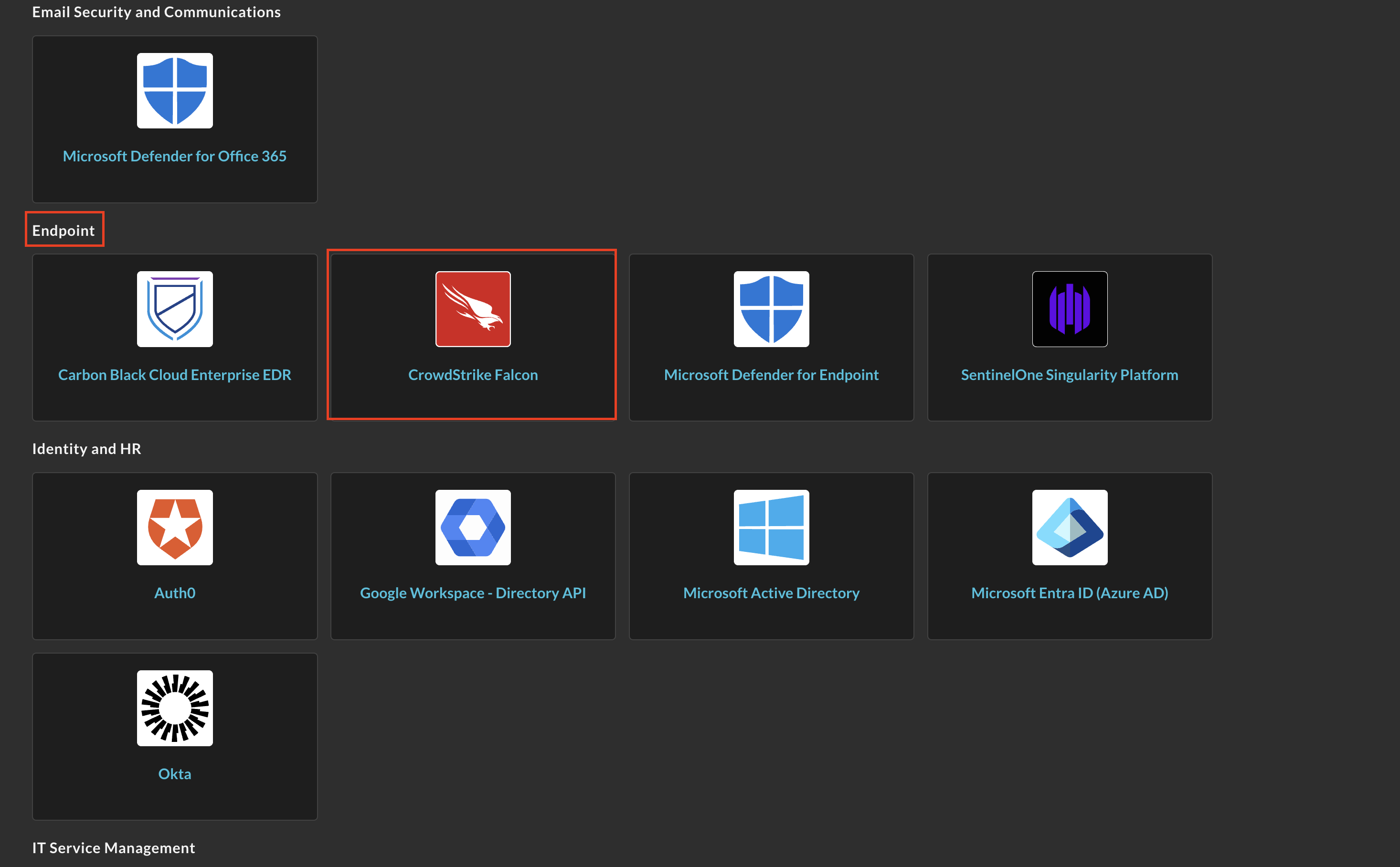
FIG. 5 - Adding the CrowdStrike Falcon Connector
-
In the Configure Connector section, provide the following details (FIG. 6):
- Connector Alias Name: A descriptive name for this connector (e.g., "CrowdStrike Spotlight - Production")
- Default Login: Leave as
Default Login - Falcon API Client ID: Your Falcon API Client ID from the prerequisites
- Falcon Secret Access Key: Your Falcon API Client Secret
- Falcon API Base URL: (Optional) Region-specific base URL if required
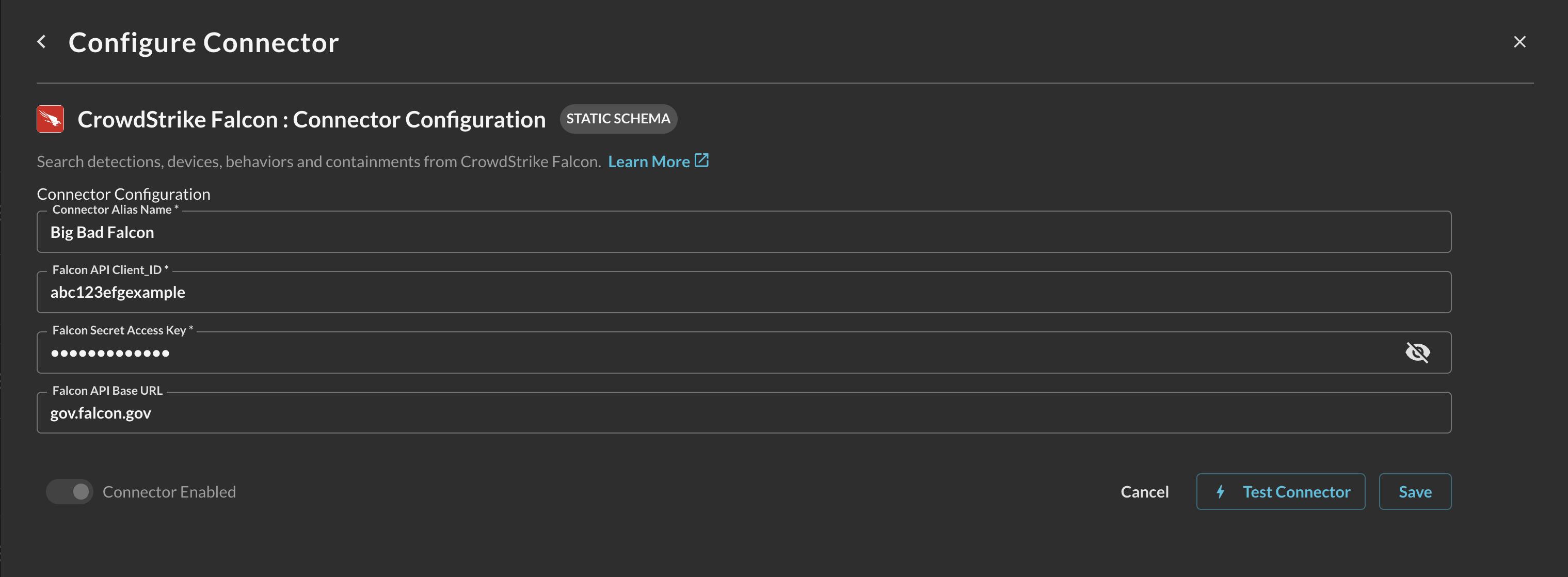
FIG. 6 - Connector configuration for Spotlight
-
Select Save to create and activate the Connector.
-
Select Test Connection to verify your API credentials and ensure Query can successfully access the Spotlight Vulnerabilities API.
Your CrowdStrike Falcon Spotlight connector is now ready for federated searches within Query.
Querying CrowdStrike Falcon Spotlight Data
Within the Query Search UI, ensure your CrowdStrike Falcon Spotlight Connector is enabled by checking the Endpoint section of the Selected Connectors dropdown (FIG. 7).
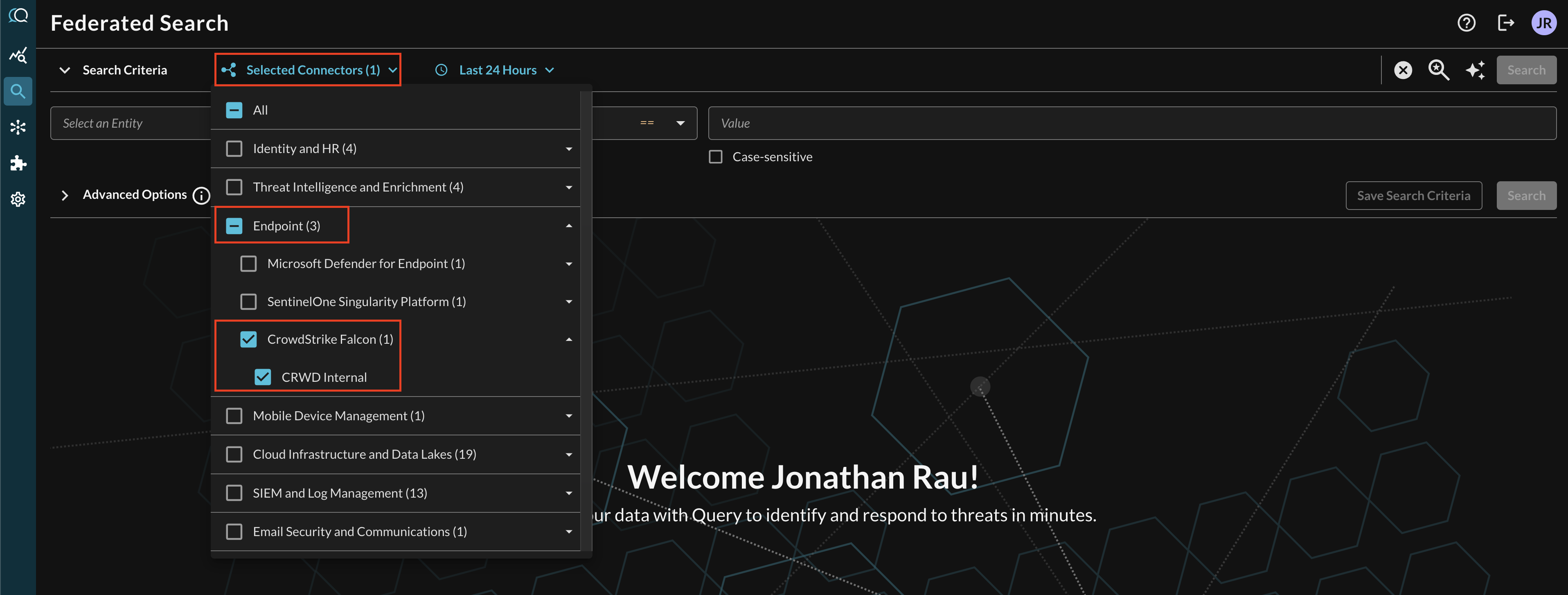
FIG. 7 - Enabling the CrowdStrike Falcon Connector
Resources
- CrowdStrike Falcon Spotlight Documentation
- Spotlight Vulnerabilities API Reference
- CrowdStrike Developer Center
- ExPRT.AI Technology Overview
Troubleshooting Tips
- API Access: Ensure your API client has the Spotlight Vulnerabilities (Read) scope enabled
- Licensing: Verify your CrowdStrike license includes Falcon Spotlight functionality
- Data Availability: New vulnerabilities may take time to appear as systems are assessed
- Connectivity: Check that Query can reach your specified API base URL
- Rate Limits: The Spotlight API has rate limiting; Query handles this automatically with retry logic
If you encounter issues beyond these common solutions, contact your Query Sales Engineer, Customer Success Manager, or support team for assistance.
Updated 11 months ago